Skip to content
PhraseCalcGet notified
PhraseCalc app icon

Math in plain words.

A notepad calculator for iPhone, iPad and Mac. Type it like you’d say it: percentages, units, dates and currencies just work, and every line gets its answer.

Launch prices: iPhone & iPad $3.49 · Mac $6.99 · pay once, no subscription

  1. Welcome to PhraseCalc
  2. Write a calculation on any line, the way you'd say it.
  3. The answer appears on the right. Tap it to copy.
  4. # Everyday math
  5. Milk: 2.492.49
  6. Bread: 3.203.2
  7. Cheese: 7.857.85
  8. Apples: 4.154.15
  9. Groceries total: sum17.69
  10. Dinner bill: 8686
  11. With 15% tip: prev + 15%98.9
  12. Split 4 ways: prev / 424.73
  13. Which pack is cheaper per item?
  14. Big pack: 7.20 / 61.2
  15. Small pack: 2.80 / 21.4
  16. # Percentages
  17. Sale price: 1250 - 20%1,000
  18. With 20% tax: 1250 + 20%1,500
  19. Before 20% off: 20% off what is 10001,250
  20. 25 is what % of 20012.5%
  21. Pay rise: 75k is what % more than 60k25%
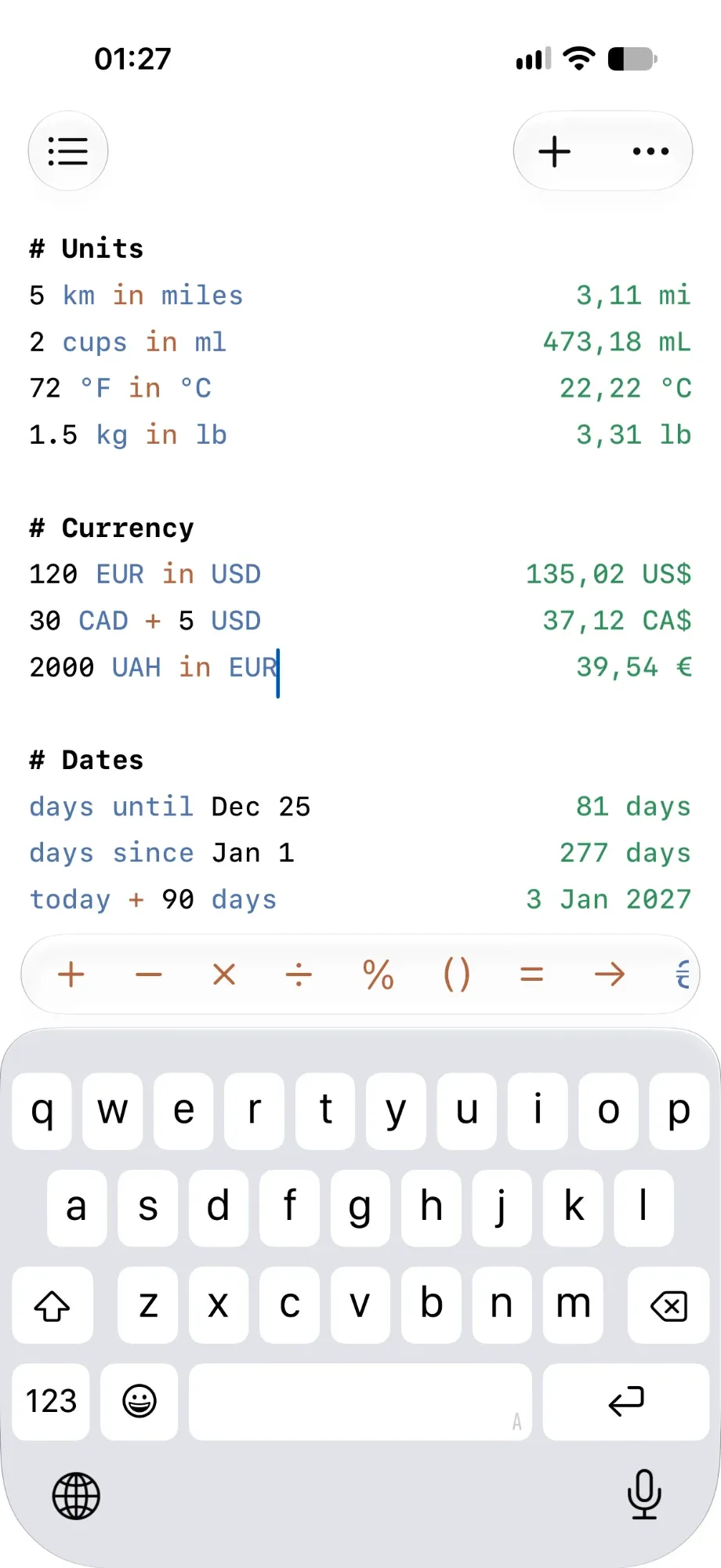
  22. # Units
  23. 5 km in miles3.11 mi
  24. 2 cups in ml473.18 mL
  25. 72 °F in °C22.22 °C
  26. 1.5 kg in lb3.31 lb
  27. # Currency
  28. 120 EUR in USD$135.02
  29. 30 CAD + 5 USDCA$37.12
  30. 2000 UAH in EUR€39.54
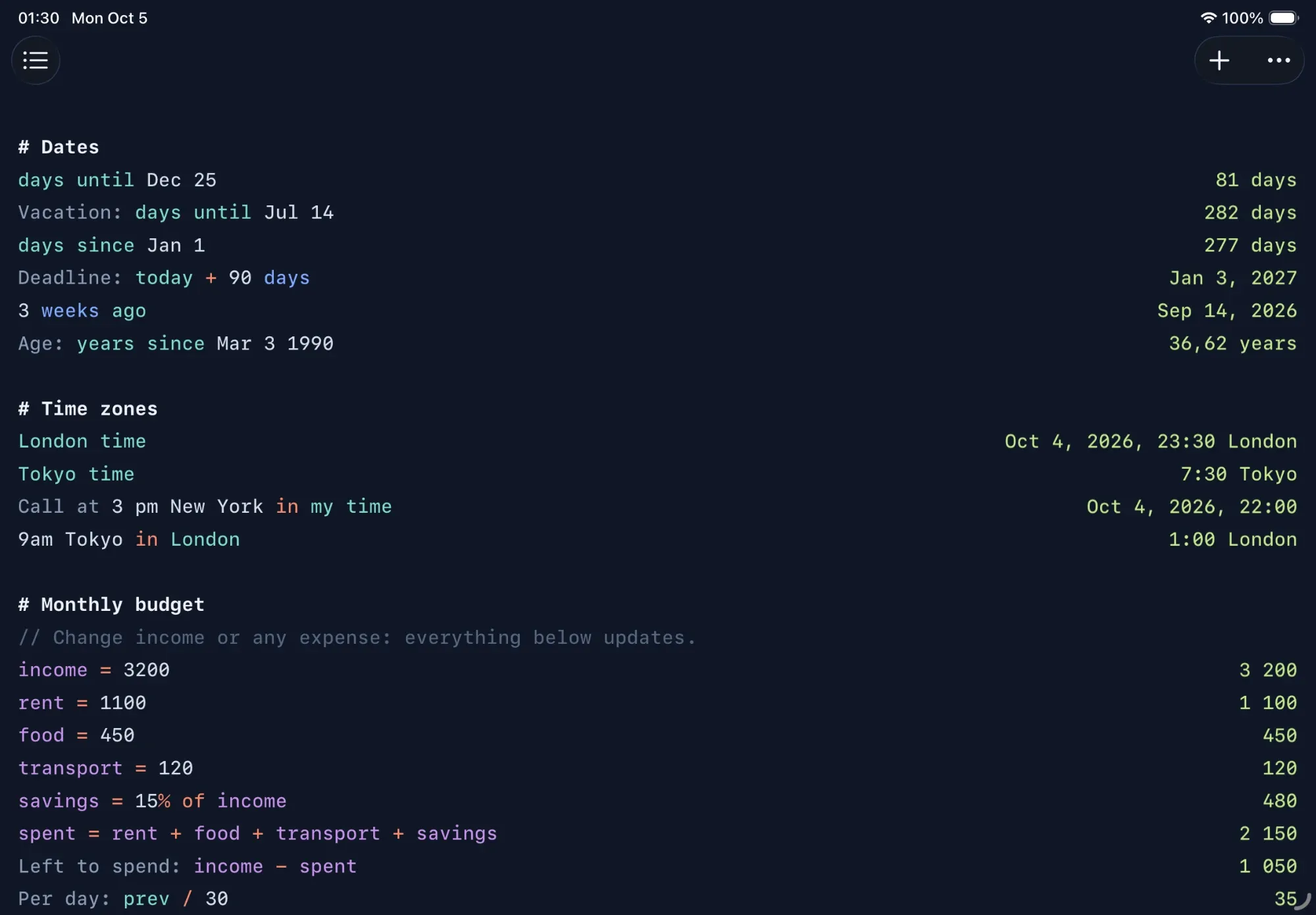
  31. # Dates
  32. days until Dec 2582 days
  33. Vacation: days until Jul 14283 days
  34. days since Jan 1276 days
  35. Deadline: today + 90 daysJan 2, 2027
  36. 3 weeks agoSep 13, 2026
  37. Age: years since Mar 3 199036.61 years
  38. # Time zones
  39. London timelive in the app
  40. Tokyo timelive in the app
  41. Call at 3 pm New York in my timelive in the app
  42. 9am Tokyo in LondonOct 5, 2026, 1:00 AM London
  43. # Monthly budget
  44. Change income or any expense: everything below updates.
  45. income = 32003,200
  46. rent = 11001,100
  47. food = 450450
  48. transport = 120120
  49. savings = 15% of income480
  50. spent = rent + food + transport + savings2,150
  51. Left to spend: income - spent1,050
  52. Per day: prev / 3035
  53. Rent share: rent as a % of income34.38%

Write it the way you think it

Percentages, units, dates, currencies and names for numbers, all in plain words.

Discounts, tips, tax and raises, written the way you'd say them. Twelve ways to ask, from “20% off” to “what % more than”.

How percentages work →
  1. Jacket: $120 - 30%$84
  2. Tip: 18% of $64.50$11.61
  3. $95 is what % of $12079.17%
  4. 20% off what is $48$60

iPhone, iPad and Mac

Made for each one. iCloud sync is coming in 1.0: start a note on your phone, finish it on your Mac.

  1. Monthly budget
  2. Change income or any expense: everything below updates.
  3. income = 32003,200
  4. rent = 11001,100
  5. food = 450450
  6. transport = 120120
  7. savings = 15% of income480
  8. spent = rent + food + transport + savings2,150
  9. Left to spend: income - spent1,050
  10. Per day: prev / 3035
  11. Rent share: rent as a % of income34.38%

Lives in your menu bar

Always one click away, out of the way the rest of the time.

One shortcut

Open it from any app with a shortcut you choose.

Pin on top

Keep the window above your other apps while you work.

Pay once

No subscription. It’s yours.

No tracking.

No account, no analytics, no AI. Everything is calculated on your device, so nothing reaches us.

Works offline

Everything is calculated on your device. Exchange rates are cached, or set your own.

10+ themes

Light and dark, plus your own syntax colours.

Text size

Make the text as big as you like, with three line spacings.

Your number format

Separators, decimal places, date and time formats.

Coming in 1.0

iCloud sync

Your notes on every device, as plain text files in your own iCloud.

Reusable templates

Name your numbers once. Change one, and the whole note follows.

Print, share, copy

Send a note to anyone, with every answer included.

Coming soon

Locked documents

Private notes behind Face ID or Touch ID.

Everything it understands

Tap any tile to see how it works, with examples.

Percentages

Discounts, tax, tips and changes

Add or take away a percentage the way you'd say it.

  1. 1250 - 20%price after a 20% discount1,000
  2. 1250 + 20%price with 20% tax1,500
  3. 15% of 8612.9

Find what share one number is of another, or how much something changed.

  1. 25 is what % of 20012.5%
  2. 300 as a % of 120025%
  3. 75 is what % more than 60a rise from 60 to 7525%
  4. 45 is what % less than 60a drop from 60 to 4525%

Work backwards from a price you paid.

  1. 20% off what is 1000the price before a 20% discount1,250
  2. 20% on what is 1200the price before 20% tax1,000

Units

Length, weight, volume, temperature and more

Write a number with its unit, and use “in” or “to” to convert. Full names, plurals and short forms all work.

  1. 5 km in miles3.11 mi
  2. 2 cups in ml473.18 mL
  3. 72 °F in °C22.22 °C
  4. 1.5 kg to lb3.31 lb

Mix units in one calculation, and convert the answer with “in” if you like.

  1. 1 m + 20 cm1.2 m
  2. 1 hour 30 min in min90 minutes
  3. 500 GB + 1.5 TB2,000 GB

Tip: Supported: length, area, volume, weight, temperature, time, speed, data, angles and typographic units.

Currency

Live rates for over 150 currencies

Write amounts with a currency code or symbol, and convert with “in”. You can mix currencies in one calculation.

  1. 120 EUR in USD$135.02
  2. 2000 UAH in EUR€39.54
  3. 30 CAD + 5 USDCA$37.12

Rates update automatically a few times a day and are saved for offline use. You'll find when they were last updated in Settings.

Dates

Count days, add weeks, find deadlines

Count how long until a date, or how long has passed since one. Add the unit you want to count in.

  1. days until Dec 2582 days
  2. weeks until Dec 2511.71 weeks
  3. days since Jan 1276 days
  4. years since Mar 3 1990an age36.61 years

Move forward or back from today.

  1. today + 90 daysJan 2, 2027
  2. 3 weeks agoSep 13, 2026
  3. 2 months from nowlive in the app

Subtract two dates to get the time between them.

  1. Jul 14 - Jul 311 days

Tip: Dates can be written as Dec 25, 25 December or 2026-12-25. A date without a year means the next one for “until” and the last one for “since”.

Time Zones

The time anywhere, and meeting times

Ask for the time in a city, country or zone.

  1. London timelive in the app
  2. Tokyo timelive in the app
  3. time in Ukrainelive in the app

Convert a time from one place to another. “my time” means where you are.

  1. 3 pm New York in my timelive in the app
  2. 9am Tokyo in LondonOct 5, 2026, 1:00 AM London

Count down to a time today.

  1. hours until 6 pmlive in the app

Reusable Calculations

Name your numbers and change them later

Give a number a name with “=”, then use the name in the lines below. Change the number and every answer that uses it updates.

  1. income = 32003,200
  2. rent = 11001,100
  3. savings = 15% of income480
  4. Left: income - rent - savings1,620

This turns a document into a template: a budget, a tax form or a price quote you fill in by changing one or two numbers.

Tip: Tap a name to copy it. Rename a name where it's set, and the lines below follow.

Everyday Math

Totals, tips, splitting and comparing

Use + − × ÷ or the words plus, minus, times and divided by. Parentheses work as you'd expect.

  1. (12 + 8) × 360
  2. 2k + 500k means thousand; million works too2,500

“sum” adds up the lines above it, back to the nearest empty line or heading. “average” works the same way.

  1. Milk: 2.492.49
  2. Bread: 3.203.2
  3. Cheese: 7.857.85
  4. Total: sum13.54

“prev” is the answer of the line above, handy for building a calculation step by step.

  1. Dinner: 8686
  2. With tip: prev + 15%98.9
  3. Each of 4: prev / 424.73

More

Functions, rounding and number formats

Common functions are built in.

  1. sqrt 164
  2. round 2.5673
  3. 10!3,628,800

Show a number in another format.

  1. 255 in hex0xFF
  2. 12 in binary0b1100
  3. 1234567 in sci1.23e6

Tip: Change how many decimal places answers show in Settings.

Read the Guide →

Our promise

Buy once. Yours forever.

Hi,

We made PhraseCalc because we wanted a calculator that reads like our own notes. Before you buy it, here’s what you can count on.

You pay once. There’s no subscription, not now and not later.

There’s no account, no ads, no tracking and no AI reading your notes. Every calculation happens on your device, so nothing about you or what you write ever reaches us.

Your notes stay yours: plain text files on your devices, and in your own iCloud once sync arrives. Open them anywhere, take them anywhere.

Updates are free, and the app you bought is yours to keep, whatever comes next.

Thanks for reading,

The PhraseCalc Team

Pay once. That’s it.

Get the app for the devices you use. Have both? iCloud sync between them is coming in 1.0.

Mac

macOS 26 or later
$6.99 $9.99 (US)

iPhone & iPad

iOS 26 or iPadOS 26 or later
$3.49 $4.99 (US)

One-time purchase · no subscription · Family Sharing included

Good to know

Is it really a one-time purchase?

Yes. You pay once for the iPhone & iPad app, the Mac app, or both, and they’re yours. Updates are free, and Family Sharing is on, so your family can use it too.

Will it turn into a subscription later?

No. No subscription, no in-app purchases, no “pro” tier. That’s a promise, not a pricing experiment.

Do you track me or collect my data?

No. There’s no account, no analytics, no trackers and no AI. Every calculation runs on your device, your notes stay on your devices, and nothing about you reaches us.

Does it work offline?

Yes. Every calculation runs on your device. Currency conversions use the last rates downloaded, and you can set your own rates.

Be the first to know

One email when it launches, with the launch price. Nothing else.